I got thrown off quite a few times when there are textual fields covering names of people or companies across the globe. The error message I frequently received is:
‘ascii’ codec can’t encode character u’\u2019′ in position 16: ordinal not in range(128)
Various encoding system applied causes the issues, hence it’s needed to dig deeper into the mechanism behind to solve this problem.
I am referencing a great explanation from the stackoverflow founder Joel Spolsky, writing his post of this knowledge. https://www.joelonsoftware.com/2003/10/08/the-absolute-minimum-every-software-developer-absolutely-positively-must-know-about-unicode-and-character-sets-no-excuses/, where he quipped that “plain text = ascii = characters are 8 bits” is not only wrong, it’s hopelessly wrong”, it’s time, “it does not make sense to have a string without knowing what encoding it uses. “
We all know some basic computer architectural theory that the computer can only process binary input 1 or 0, representing switch on or off status. In an 8 binary system, a letter A can be mapped to 0100 0001. Unicode is a computing industry standard for the consistent encoding, representation, and handling of text expressed in most of the world’s writing systems, the latest version of Unicode contains a repertoire of over 136,000 characters covering 139 modern and historic scripts, as well as multiple symbol sets. The Unicode standard defines UTF-8, UTF-16, and UTF-32, and several other encodings are in use. The most commonly used encodings are UTF-8, UTF-16 and UCS-2, a precursor of UTF-16. UTF-8, dominantly used by websites (over 90%), uses one byte for the first 128 code points, and up to 4 bytes for other characters. The first 128 Unicode code points are the ASCII characters, so an ASCII text is a UTF-8 text. (from wiki).
UTF-8 was another system for storing your string of Unicode code points, those magic U+ numbers, in memory using 8-bit bytes. In UTF-8, every code point from 0-127 is stored in a single byte. Only code points 128 and above are stored using 2, 3, in fact, up to 6 bytes.
Unicode was meant to – a brave effort – create a single character set that included every reasonable writing system on the planet. But in Unicode, the letter A is platonic ideal. Every platonic letter in every alphabet is assigned a magic number by the Unicode consortium which is written like this: U+0639. this magic number is called a code point. so a string “Hello”, in Unicode’s code points is U+0048 U+0065 U+006C U+006C U+006F.
When there’s no equivalent for the Unicode code point you’re trying to represent in the encoding system UTF-8, usually, you will get a little question mark: ? or, been thrown an error as displayed previously.
Some popular encodings of English text are Windows-1252 (the Windows 9x standard for Western European languages) and ISO-8859-1, aka Latin-1 (also useful for any Western European language). To address this issue or error, the following python lines will help,
ppu[‘Individual Name’] = ppu[‘Individual Name’].str.decode(‘latin-1’).str.encode(‘utf’)
ppu[‘title’] = ppu[‘title’].str.decode(‘latin-1’).str.encode(‘utf’)
import codecs
def changeencode(data, cols):
for col in cols:
data[col] = data[col].str.decode(‘iso-8859-1’).str.encode(‘utf-8’)
return data
#encoding error function
def changeencode(data, cols):
for col in cols:
data[col] = data[col].str.decode(‘latin-1’).str.encode(‘utf-8’)
return data
Note, on Windows, many editors assume the default ANSI encoding (CP1252 on US Windows) instead of UTF-8 if there is no byte order mark (BOM) at the start of the file.
pet_df.to_csv(‘checkingst.csv’, encoding=’utf-8-sig’)
After following professor Hannah Bast’s lecture on vector space model, this concept is understood much deeper now. Here is how.
So first is to show the ASCII table

on top of ASCII, there are variants, and ISO-8859-1 is one of the variants, particularily for characters from most of the European languages such as below

Unicode simply assign a unique number called code point to almost every character or symbol in the world. Totally there are 1.1 million code points(hex: 0 .. 10FFFF). To encode all these many code points, there is this Unicode Transformation Standard UTF providing the scheme for transforming.
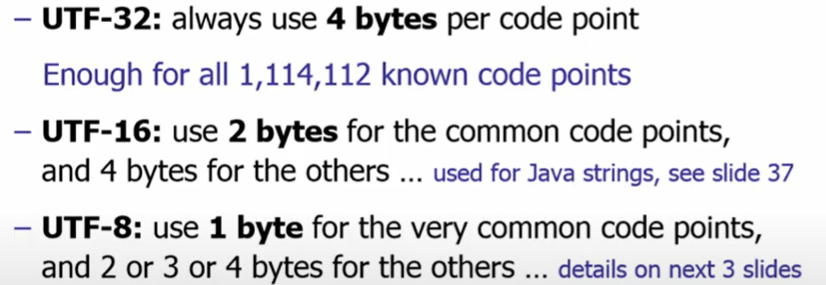
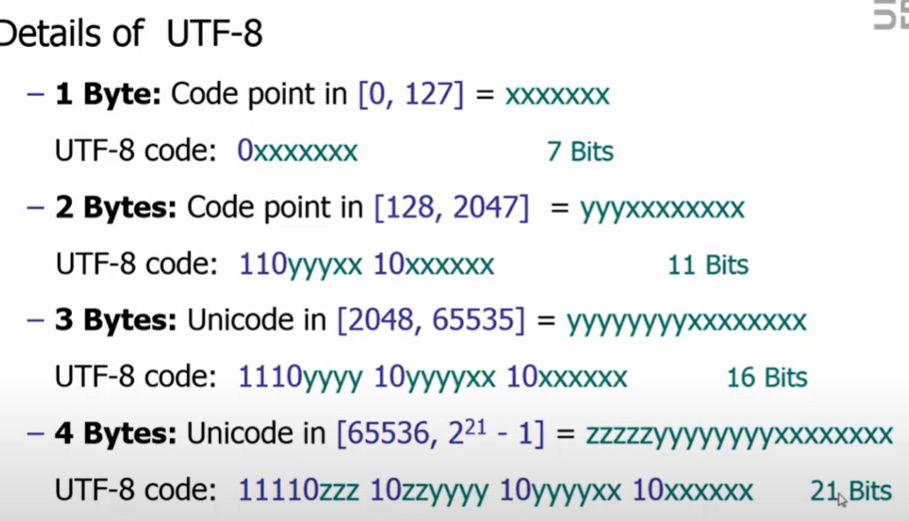
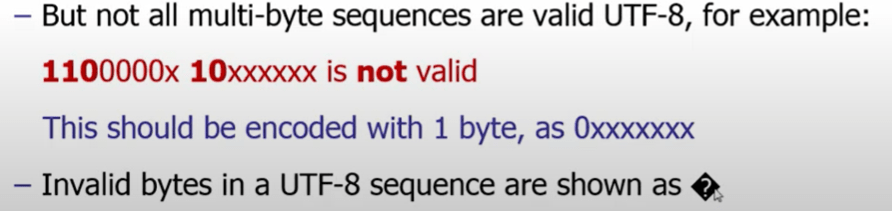
UTF-8 is ASCII backward compatible and also ISO-8859-1 compatible,

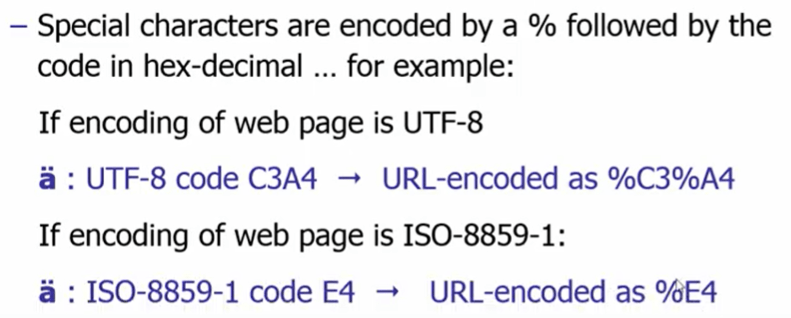
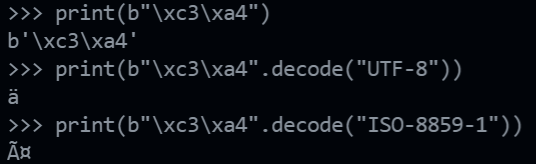
However, if we use the old ISO-8859-1 to interpret the bytes format of this German letter, this often shown C3, A4 would be interpreted as

In web portal,
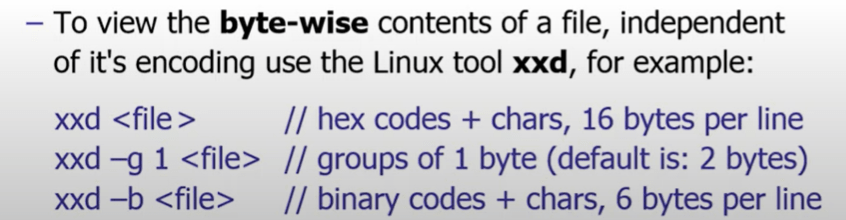
Linux tool of xxd is quite powerful to view the actual byte content
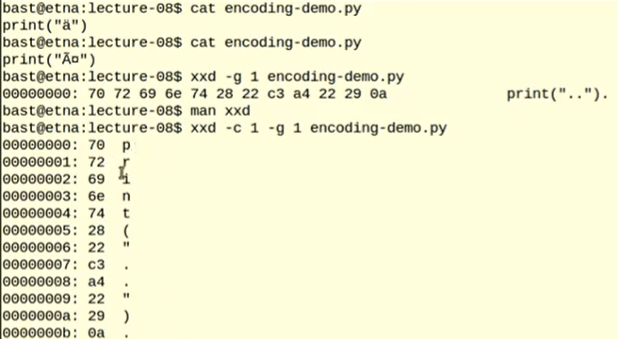
python has both byte array strings and unicode strings, the byte array strings = b”…”
print(b"\xc3\xa4")
print(b"\xc3\xa4".decode("UTF-8"))
print(b"\xc3\xa4".decode("ISO-8859-1"))

 Naixian Zhang