Heroku is extensively used because of it’s power to facilitate a quick app launch, to be more official, it ” runs and manages applications written in Ruby, Node.js, Java, Python, Clojure, Scala, Go and PHP”, Google App Engine is also providing similar service, while Heroku, now a subsidiary of Salesforce is edging out.
Following the detailed walk through at its website:
$ sudo snap install heroku – classic
$ heroku login
$git clone https//github.com/heroku/python-getting-started.git
$cd python-getting-started
##deploy the app
$heroku create

$git push heroku master

##now app is deployed, ensure that at least one instance of the app is running
$ heroku ps:scale web=1
##to visit the app at the URL generated by its app name
##as a handy shortcut, open it as follows
$ heroku open
##view the log
$ heroku logs –tail
##define a procfile
##procfile is a text file in the root directory
##to explicitly declare waht command should be executed to start the app
web: gunicorn gettingstarted.wsgi –log-file –
##check how many dynos are running
$ heroku ps
$ heroku ps:scale web=1
##declare app dependencies
##The requirements.txt file lists the app dependencies together
$ pip install -r requirements.txt
$ pip list #to see other dependencies instaleld
##now run the app locally
$ python manage.py collectstatic
$ heroku local web -f Procfile.windows
##to push local changes
$ pip install requests
##and then add it to requirments.txt file:
- django
- gunicorn
- django-heroku
- requests
##add import requests to hello/views.py file
##modify the index method to make use of the module
def index(request):
r = requests.get(‘http://httpbin.org/status/418’)
print(r.text)
return HttpResponse(‘<pre>’ + r.text + ‘</pre>’)
$ heroku local
$ git add .
$ git commit -m “Demo”
$ git push heroku master
$ herok open
##start a console
$ heroku run python manage.py shell
##The Python shell is running in the context of your app and all its dependencies. so one can type in python commands interactively direclty
##To get a real feel for how dynos work, you can create another one-off dyno and run
$ heroku run bash
##Each dyno has its own ephemeral filespace, populated with your app and its dependencies
exit to exit the dyno
##To set the config var on Heroku, execute the following
$ heroku config : set TIMES=2
##view the config vars
$ heroku config
##use the free Heroku Postgres add-on that was automatically provisioned when your app was deployed
$ heroku addons
$ heroku pg
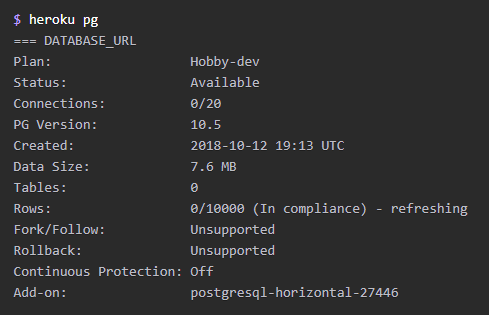
so, if the app is deployed at
https://wonderful-app-287.herokuapp.com , then go to
https://wonderful-app-287.herokuapp.com /db to find the database.
#to create tables
$ heroku run python manage.py migrate
once you have the postgres installed locally, type the following to view db
$ heroku pg:psql
Noted on 4/3/2020, to deploy more apps, I learned that it’s very important to use the logs to check the status, especially the error message. When multiple packages are invoked with multiple versions available, ensure compatibility with each other is essential.
for example, heroku itself is displayed as heroku version in 2013, but actually it has the latest version heroku3 available, which can work with dateuti version of 2.8, not have to downgrade to 1.5. Make sure the requirements.txt reflect not only package name but also versions. Once the app is working on local host, use pip freeze > requirements.txt to freeze the settings. And then run pip install -r requirements.txt to mass install them.
 Naixian Zhang