When dealing with large amount of data, speed is essential. The following link provides some good tips. However, the 23 tips are not very concretely related to my daily workflow, so I summarized the below:
- Query the large table all at once and once, when querying it, restrict in where clause to make it terse and hence fast.
- use CASE instead of UPDATE
- Try to use temp tables to improve cursor performance
- Avoid nest views
- Don’t use joins (denormalize your data) , use indexes, we should use index properly
- Create joins with INNER JOIN (not WHERE)
- Use WHERE instead of HAVING to define filters
- Use Top or LIMIT 10 in the end to sample queries
- SELECT Specific Columns, Avoid SELECT *
- Be SARGable (Search ARGument Able): Write conditions so the database can use an index effectively. Avoid: Functions on indexed columns: WHERE YEAR(OrderDate) = 2023 (bad) vs. WHERE OrderDate >= ‘2023-01-01’ AND OrderDate < ‘2024-01-01’ (good). Leading wildcards in LIKE: WHERE Name LIKE ‘%Smith’ (bad, usually can’t use index) vs. WHERE Name LIKE ‘Smith%’ (good, can use index).
- Filter early and often – reduce the working data set as soon as possible
- Optimize JOIN Operations: inner join not cross join
- Minimize Large Sorts (ORDER BY) and Grouping (GROUP BY):
- WHere is better than Having
- Use UNION ALL instead of UNION if Duplicates are Acceptable:
- Execution Plans (EXPLAIN, EXPLAIN ANALYZE, Graphical Plans):
- This is your most important tool! Learn how to read the execution plan provided by your database system.
- It shows how the database actually intends to execute your query.
- Look for:
- Table Scans: Often indicate missing indexes (unless the table is tiny or you need most rows). Aim for Index Seeks or Index Scans.
- Expensive Operators: Hash Joins, Sorts on large datasets, Key Lookups (indication a non-clustered index isn’t covering).
- Cardinality Estimates: Are the estimated row counts wildly different from the actual row counts? (Indicates outdated statistics).
- Highest Cost Operators: Focus your optimization efforts there first.
- Database Profiling Tools: (e.g., SQL Server Profiler, pg_stat_statements in PostgreSQL) Identify the queries that are running most frequently or taking the longest time overall on your server.
- Performance Counters/Monitoring: Monitor overall server health (CPU, Memory, Disk I/O) to rule out hardware bottlenecks.
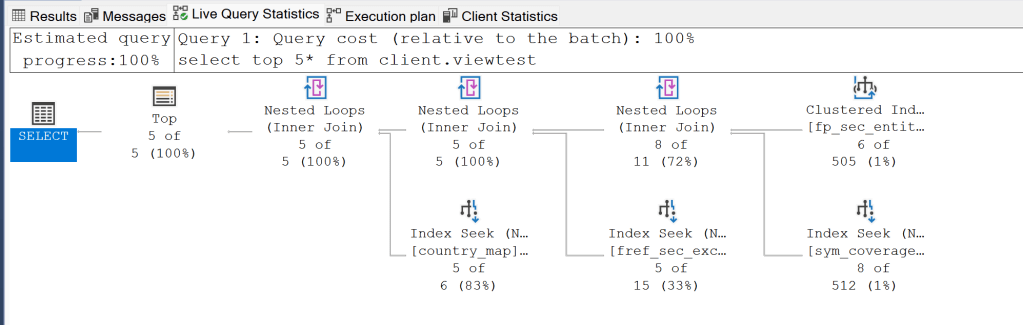
This query is frequently executed or part of a larger workload:
- Consider creating a covering index on fp_sec_entity to avoid the clustered index scan
- Review if all the joins are necessary for your use case
- If the view is complex and infrequently updated, consider materializing the results
Optimizing solutions from sonnet 3.7
- Add Early Filtering:
- Add WHERE clauses to filter data before joins
- Example:
WHERE sc.fref_security_type IN ('SHARE', 'DR', 'ADR', 'PREFEQ')before the join
- Optimize Join Order:
- Start with the smallest table or the one with the most restrictive filters
- Consider reordering joins to process the smallest result sets first
- Use OPTION Hints (if supported) (SELECT TOP 5 …FROM …OPTION (OPTIMIZE FOR (@param = value), FAST 5))
- Consider a Covering Index: Use EXISTS Instead of JOIN
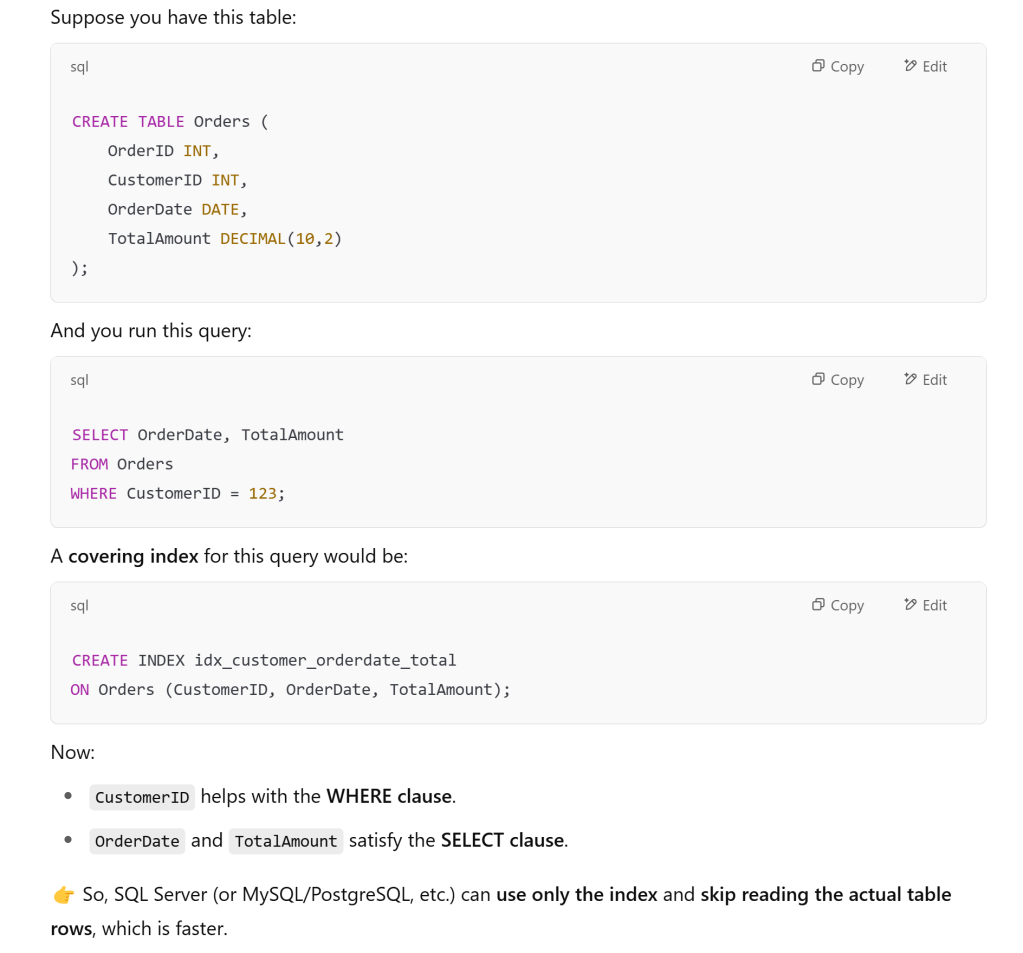
A covering index is a special type of index that includes all the columns needed to satisfy a query without having to access the actual table data. This is also sometimes called a “covered query” or an index with “included columns.”
How Covering Indexes Work
- Standard Index Operation:
- In a normal index lookup, the database finds the row pointer in the index
- Then performs a separate operation to fetch the actual data from the table (called a “bookmark lookup”)
- This requires two disk operations: one to read the index, one to read the table
- Covering Index Operation:
- With a covering index, all required data is stored within the index itself
- The database can satisfy the query entirely from the index without accessing the table
- This requires only one disk operation: reading the index
This explanation is not as good as openAI’s
 Naixian Zhang