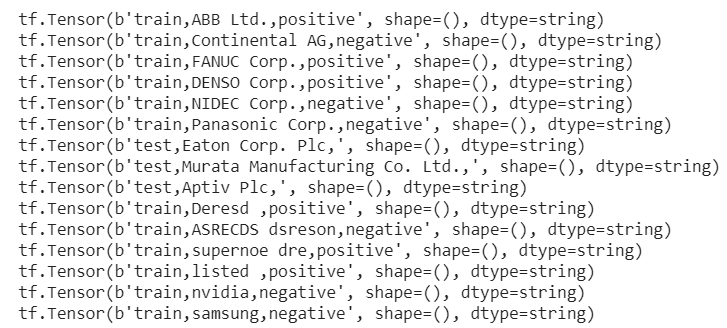
I start with a simple input file in csv format, composed of Category(test or training), Documents(short docs from LSA project), and Label(positive or negative). Then feed into google colab to run through Keras Sequential Model to process. The file is named Hydrogen.ipynb in google drive.
import tensorflow as tf
import tensorflow_datasets as tfds
from tensorflow import keras
from tensorflow.keras import layers
import pickle
import pandas as pd
import io
from io import BytesIO
from google.colab import files
#file_names = ‘C:\\Users\\ncarucci\\AMD\\test.csv’
#pd.read_csv(io.BytesIO(files.upload()[file_names]))
#we can use upload file in google drive too, which is said to be much faster
uploaded = files.upload()

dataset = tf.data.TextLineDataset(‘test.csv’).skip(1)
for line in dataset:
print(line)
def filter_train(line):
split_line = tf.strings.split(line, “,”, maxsplit=4)
dataset_belonging = split_line[0] # train, test
sentiment_category = split_line[2] # pos, neg, unsup
return (
True
if dataset_belonging == “train” and sentiment_category != “unsup”
else False
)
ds_train = tf.data.TextLineDataset(‘test.csv’).filter(filter_train)
def filter_test(line):
split_line = tf.strings.split(line, “,”, maxsplit=4)
dataset_belonging = split_line[0] # train, test
sentiment_category = split_line[2] # pos, neg, unsup
return (
True if dataset_belonging == “test” and sentiment_category != “unsup” else False
)
ds_test = tf.data.TextLineDataset(‘test.csv’).filter(filter_test)
These two sets of data (ds_train and ds_test) separates them from one single test file.
Next we need to tokenize the texts.
tokenizer = tfds.deprecated.text.Tokenizer()
def build_vocabulary(ds_train, threshold=200):
“”” Build a vocabulary “””
frequencies = {}
vocabulary = set()
vocabulary.update([“sostoken”])
vocabulary.update([“eostoken”])
for line in ds_train.skip(1):
split_line = tf.strings.split(line, “,”, maxsplit=4)
review = split_line[1]
tokenized_text = tokenizer.tokenize(review.numpy().lower())
for word in tokenized_text:
if word not in frequencies:
frequencies[word] = 1
else:
frequencies[word] += 1
# if we’ve reached the threshold
if frequencies[word] == threshold:
vocabulary.update(tokenized_text)
return vocabulary
Apply this build_vocabulary function on ds_train
# Build vocabulary and save it to vocabulary.obj
vocabulary = build_vocabulary(ds_train)
vocab_file = open(“vocabulary.obj”, “wb”)
pickle.dump(vocabulary, vocab_file)
Then vectorize/encode it
encoder = tfds.deprecated.text.TokenTextEncoder(
list(vocabulary), oov_token=””, lowercase=True, tokenizer=tokenizer,
)
#note oov is out of vocabulary word
def my_encoder(text_tensor, label):
encoded_text = encoder.encode(text_tensor.numpy())
return encoded_text, label
def encode_map_fn(line):
split_line = tf.strings.split(line, “,”, maxsplit=4)
label_str = split_line[2] # neg, pos
review = “sostoken ” + split_line[1] + ” eostoken”
label = 1 if label_str == “pos” else 0
(encoded_text, label) = tf.py_function(
my_encoder, inp=[review, label], Tout=(tf.int64, tf.int32),
)
encoded_text.set_shape([None])
label.set_shape([])
return encoded_text, label
AUTOTUNE = tf.data.experimental.AUTOTUNE # prefetch elements from the input dataset ahead of the time they are requested
ds_train = ds_train.map(encode_map_fn)
ds_train = ds_train.shuffle(25000)
ds_train = ds_train.padded_batch(32, padded_shapes=([None], ()))
ds_test = ds_test.map(encode_map_fn)
ds_test = ds_test.padded_batch(32, padded_shapes=([None], ()))
Now build the model
model = keras.Sequential(
[
layers.Masking(mask_value=0),
layers.Embedding(input_dim=len(vocabulary) + 2, output_dim=32,),
layers.GlobalAveragePooling1D(),
layers.Dense(64, activation=”relu”),
layers.Dense(1),
]
)
model.compile(
loss=keras.losses.BinaryCrossentropy(from_logits=True),
optimizer=keras.optimizers.Adam(3e-4, clipnorm=1),
metrics=[“accuracy”],
)
model.fit(ds_train, epochs=15, verbose=2) #verbose 0, 1 or 2 you just say how do you want to ‘see’ the training progress, 0 is nothing, 1 is progress bar, 2 is simple number of epochs
model.evaluate(ds_test)
Now the model is trained and tested, we can apply it to good usage.
 Naixian Zhang