the link is: https://cookbook.openai.com/examples/assistants_api_overview_python
using configuration one can define detailed and custom steps/guidance for the GPT to be specialized in doing certain task. but what really makes it powerful is to use the tools or actions – code interpreter, retrieval and function calling. note function calling can not only call openai internal functions but also external function via third-party APIs.
the python function built by openai realized async, thread containing message, separating message ID, assistant ID, run IDs, which is crafty and creative to be embedded in custom Apps. this blog is to focus on ‘function calling’ which can be powerful and gearing toward custom applications.
first, reference this hubel Labs clip how she uses function calling to manage membership ID, emailing etc.
she defines several functions, each function will have a name, a description, a parameter and a required. in parameter, there are type (could be object), properties, properties include userid (type string, description “the userid of the user should receive subscription”), productid (type string, description, and enum (silver tier, gold tier, gold-plus tier), months (type integer, description), after defining necessary functions, we need redefine the assistant, which is the class of client.beta.assitants.create(name, instructions, model, tools = [{“type”: “retrievel”}, {“type”: “function” , “function”: give_manual_IAP}, {“type”: “function”, “function”: send_single_email}, {“type”: “function”, “function”: fetech_user_id}], file_id = [file_id]). The demo shows one function only. it’s also fine to run multiple functions parallely.
Paralle function runs is demoed by openai team in their dev day. conclusion is that we can define function in json fomat, apply thread, message run all in one assistant API. it also allows multiple function running in sequential order as is in the demo example of turn on a music and crank up to a car assistant.
next I would like to explore the invocation of third-party API in funciton calling. for example in their cookbook in August, one has to write specific functions to do recommendations per user request using client.chat.completion.create(), while now given the ability to use client.beta.assistants.create() or client.beta.assistants.update(). They key differecen is here, you define an assistant, where tools has type of “function”: function_json is all in json fomat like using natural language.
assistant = client.beta.assistants.update(
    MATH_ASSISTANT_ID,
    tools=[
        {"type": "code_interpreter"},
        {"type": "retrieval"},
        {"type": "function", "function": function_json},
    ],
)
show_json(assistant)
thread, run = create_thread_and_run(
    "Make a quiz with 2 questions: One open ended, one multiple choice. Then, give me feedback for the responses."
)
run = wait_on_run(run, thread)
run.status
show_json(run) # will say require action
Hence, we should be able to replace Aug version of mechanical function with the json formatted function woven into the assistant API.
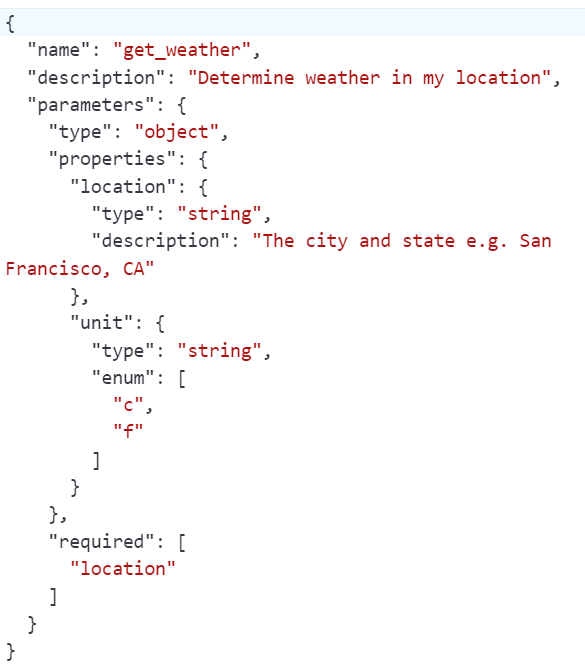
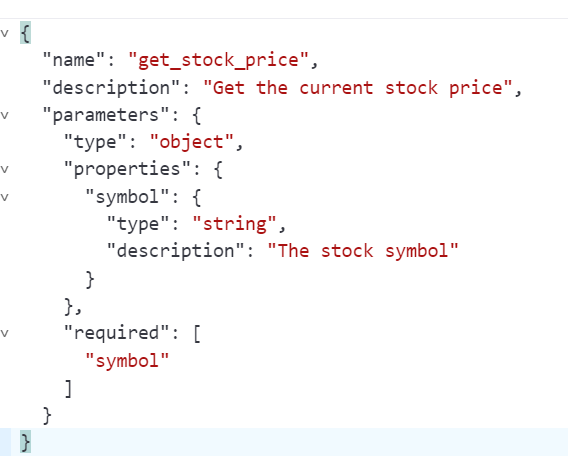
Pasting several functions for reference purpose:
get weather sample function
get stock price
how to define json funciton calling a third-party API? here is a good example by Liam Ottley. First solar panel cost calculation function is partialy shown here, you don’t need to write on your self, chatGPT should be able to guide you:
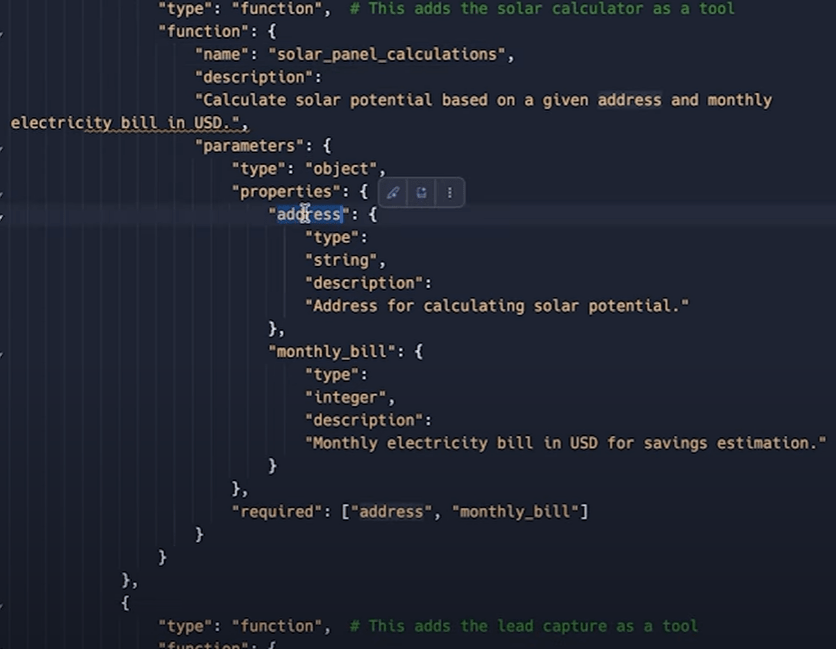
following along the whole clip, one can build up a buisness chatting bot on a web page and collecting leads, serving clients insanely powerufl and efficiently! thinking about using this new feature to connect to FactSet APIs, so ceratin parameters in user input triggers various usage such as price data, screening setting, optimization setting, PA setting… and all in a friendly chatbot format!
next blog, leveraging the gigantic amount of token limit upsizing to feed in whoel MDS sql schema and ask to write SQL codes to fetch any structured data!
On 20231109, openAI GPT playground replaced the template and getweather schema, here is the template and weather schema respectively:
{
"openapi": "3.1.0",
"info": {
"title": "Untitled",
"description": "Your OpenAPI specification",
"version": "v1.0.0"
},
"servers": [
{
"url": ""
}
],
"paths": {},
"components": {
"schemas": {}
}
}

{
  "openapi": "3.1.0",
  "info": {
    "title": "Get weather data",
    "description": "Retrieves current weather data for a location.",
    "version": "v1.0.0"
  },
  "servers": [
    {
      "url": "https://weather.example.com"
    }
  ],
  "paths": {
    "/location": {
      "get": {
        "description": "Get temperature for a specific location",
        "operationId": "GetCurrentWeather",
        "parameters": [
          {
            "name": "location",
            "in": "query",
            "description": "The city and state to retrieve the weather for",
            "required": true,
            "schema": {
              "type": "string"
            }
          }
        ],
        "deprecated": false
      }
    }
  },
  "components": {
    "schemas": {}
  }
}
 Naixian Zhang