A thread is a unit of execution within a process, and it’s primarily related to CPU processing rather than RAM, though it does use memory. The CPU does not store data for long durations. It processes data and instructions but relies on caches (small, fast memory located on or near the CPU) and registers (tiny storage locations within the CPU) for temporary, high-speed data handling. The actual data storage, such as stack and heap, is located in the larger RAM.
A thread is the smallest unit of processing that can be scheduled by an operating system It’s like a lightweight process that exists within a process Multiple threads can exist within the same process, sharing the same resources.
Asynchronous versus synchronous, multi-threading can achieve asynchronous:

For heavy I/O bound tasks such as read, download tasks, not requiring CPU to process/compute, multi-threading is ideal, but it does create lots of threads, which is an overhead.
It’s worth noting difference between multi-threading versus multi-processing, both seemingly concurrent but for different usage. multi-threading (Asynchronous) still handle task one by one, but won’t wait till each task taking time to complete sequentially; while multi-processing achieve running tasks concurrently for high CPU intensive tasks.
The slow way is
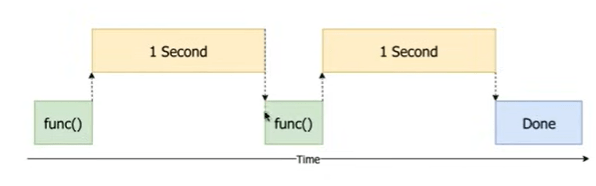
the Asynchronous/multi-threading
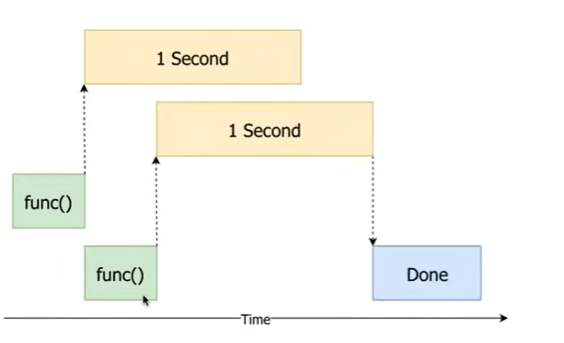
the concurrent/multi-processing
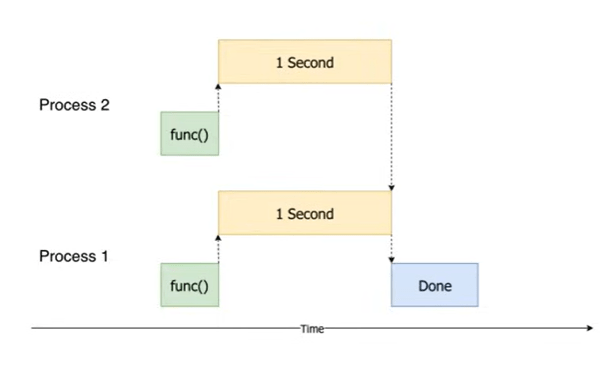
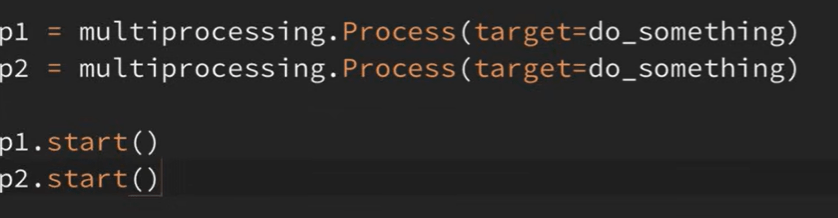

Threads are executed by CPU cores and CPU cores are made up of transistors in integrated circuits
Here is an example of C++ creating a thread
// C++ example of thread creation
#include <thread>

void threadFunction() {
    // This code runs in a separate thread
}

int main() {
    // Create a new thread
    std::thread t1(threadFunction);

    // Wait for thread to finish
    t1.join();

    return 0;
}
CPU Die
├── Core 1
│   ├── ALU (Arithmetic Logic Unit)
│   │   └── Thousands/Millions of Transistors
│   ├── Control Unit
│   │   └── Thousands/Millions of Transistors
│   ├── Cache Memory
│   │   └── Millions of Transistors
│   └── Registers
│       └── Hundreds/Thousands of Transistors
└── [Other Cores...]
How Transistors form logic?
basic logic gates:
AND Gate (using transistors)
     ┌─────┐
A ────┤     │
      │ AND ├────Output
B ────┤     │
     └─────┘
complex functions:
Transistors combine to form:
Logic gates (AND, OR, NOT, etc.)
Flip-flops (memory elements)
Arithmetic circuits
Control circuits
When to use multi-threading in Python? I/O-bound operations (file operations, network calls). Use ThreadPoolExecutor for managing thread pools. A special thing about Python is GIL (Global Interpreter Lock). Python’s GIL prevents multiple native threads from executing Python bytecodes simultaneously. Best for I/O-bound tasks rather than CPU-bound tasks.
As to how use Python Threading, here are some examples
1. Thread synchronization with lock
import threading

counter = 0
lock = threading.Lock()

def increment():
    global counter
    for _ in range(100000):
        with lock:  # Thread-safe section
            global counter
            counter += 1

# Create threads
threads = []
for _ in range(5):
    thread = threading.Thread(target=increment)
    threads.append(thread)
    thread.start()

# Wait for all threads
for thread in threads:
    thread.join()

print(f"Final counter value: {counter}")
2. Thread pool executor

from concurrent.futures import ThreadPoolExecutor
import time

def process_item(item):
time.sleep(1) # Simulate processing
return item * item

3. Using ThreadPoolExecutor

with ThreadPoolExecutor(max_workers=3) as executor:
numbers = [1, 2, 3, 4, 5]
results = list(executor.map(process_item, numbers))

print(f"Results: {results}")
Look deeper into the ThreadPoolExecutor: what’s happening under the hood is first creates 3 worker threads, these workers or threads are waiting in a pool for tasks.
Tasks:      [1, 2, 3, 4, 5]
Workers:    [Thread1, Thread2, Thread3]

Execution Flow:
Time 0s:   Thread1 → 1    Thread2 → 2    Thread3 → 3    (4,5 waiting)
Time 1s:   Thread1 → 4    Thread2 → 5    Thread3 done   (all tasks assigned)
Time 2s:   All done
Let’s see another example to use ProcessPoolExecutor:
from concurrent.futures import ProcessPoolExecutor
import time

def is_prime(n):
    if n < 2:
        return False
    for i in range(2, int(n ** 0.5) + 1):
        if n % i == 0:
            return False
    return True

def find_primes(number):
    return (number, is_prime(number))

def main():
    numbers = range(100000, 100100)  # Check numbers in this range

    # Sequential execution for comparison
    start_time = time.time()
    sequential_results = list(map(find_primes, numbers))
    sequential_time = time.time() - start_time

    # Parallel execution with ProcessPoolExecutor
    start_time = time.time()
    with ProcessPoolExecutor(max_workers=4) as executor:  # Use 4 processes
        parallel_results = list(executor.map(find_primes, numbers))
    parallel_time = time.time() - start_time

    # Print results
    print(f"Sequential time: {sequential_time:.2f} seconds")
    print(f"Parallel time: {parallel_time:.2f} seconds")
    print("\nPrime numbers found:")
    for number, is_prime_number in parallel_results:
        if is_prime_number:
            print(number, end=" ")

if __name__ == '__main__':
    main()
For CPU-intensive tasks, consider using multiprocessing instead of threading due to the GIL limitation. What are examples of CPU-intensive tasks?
Mathematical Computations, Image processing, CPU bound vs IO bound can be illustrated with this codes comparison
# CPU Bound Example
def cpu_bound():
    result = 0
    for i in range(100_000_000):
        result += i
    return result

# I/O Bound Example
def io_bound():
    with open('large_file.txt', 'r') as f:
        data = f.read()  # Waiting for disk read
    return len(data)
Use multi-processing codes:
from multiprocessing import Pool

def cpu_intensive_task(n):
    return sum(i * i for i in range(n))

# Good - Using multiprocessing
if __name__ == '__main__':
    numbers = [10000000] * 4
    with Pool(processes=4) as pool:
        results = pool.map(cpu_intensive_task, numbers)
Note heavy mathematical computation such as matrix multiplication has a huge bottleneck which can be improved by multi/parallel processing. however, even after parallel processing treatment, it is still far less optimal than using numpy dot function, because NumPy optimizes matrix multiplication through several key techniques: BLAS/LAPACK Implementation, NumPy‘s np.dot() (or np.matmul()) functions are implemented in C and optimized for performance.
 Naixian Zhang