Anthropic has just launched the MCP modal context protocol, which greatly enhances the AI agents’ building process, making it more standardized, seamless, and user-friendly than ever before! There are still ample room for improvement, such as enabling remote/virtual setup. In my experience, even though I installed the Anthropic desktop app without administrator privileges, with the right configuration adjustments, still can’t have the MCP icon activated in the app.
MCP possesses notable features; however, at its core, it remains a collection of agents, comprising a master orchestrator, various other agent roles, tools, and utilities, and corresponding pre-made function calls. Below is the breakdown: Core architecture, Resources, Prompts, Tools, Sampling, Transports.
The protocol layers codes
class Session(BaseSession[RequestT, NotificationT, ResultT]):
    async def send_request(
        self,
        request: RequestT,
        result_type: type[Result]
    ) -> Result:
        """
        Send request and wait for response. Raises McpError if response contains error.
        """
        # Request handling implementation

    async def send_notification(
        self,
        notification: NotificationT
    ) -> None:
        """Send one-way notification that doesn't expect response."""
        # Notification handling implementation

    async def _received_request(
        self,
        responder: RequestResponder[ReceiveRequestT, ResultT]
    ) -> None:
        """Handle incoming request from other side."""
        # Request handling implementation

    async def _received_notification(
        self,
        notification: ReceiveNotificationT
    ) -> None:
        """Handle incoming notification from other side."""
        # Notification handling implementation
here is a basic example of implementing a MCP server:
import asyncio
import mcp.types as types
from mcp.server import Server
from mcp.server.stdio import stdio_server

app = Server("example-server")

@app.list_resources()
async def list_resources() -> list[types.Resource]:
    return [
        types.Resource(
            uri="example://resource",
            name="Example Resource"
        )
    ]

async def main():
    async with stdio_server() as streams:
        await app.run(
            streams[0],
            streams[1],
            app.create_initialization_options()
        )

if __name__ == "__main__":
    asyncio.run(main)
the contribution from Anthropic is it defines the best practices for transport local communication (Stdio), remote communication(SSE), message handling, security consideration use TLS for remote connections, message validation, resource protection, debugging and monitoring.
Resources: resources allow servers to expose dta and content , examplePrompts are designed to be user-controlled, meaning they are exposed from servers to clients with the intention of the user being able to explicitly select them for use.
app = Server("example-server")

@app.list_resources()
async def list_resources() -> list[types.Resource]:
    return [
        types.Resource(
            uri="file:///logs/app.log",
            name="Application Logs",
            mimeType="text/plain"
        )
    ]

@app.read_resource()
async def read_resource(uri: AnyUrl) -> str:
    if str(uri) == "file:///logs/app.log":
        log_contents = await read_log_file()
        return log_contents

    raise ValueError("Resource not found")

# Start server
async with stdio_server() as streams:
    await app.run(
        streams[0],
        streams[1],
        app.create_initialization_options()
    )
Prompts are designed to be user-controlled, meaning they are exposed from servers to clients with the intention of the user being able to explicitly select them for use. To use a prompt, clients make a prompts/get request. Prompts in MCP are predefined templates that can: Surface as UI elements (like slash commands) Accept dynamic arguments Include context from resources Chain multiple interactions Guide specific workflows.
Here’s a complete example of implementing prompts in an MCP server:
const debugWorkflow = {
  name: "debug-error",
  async getMessages(error: string) {
    return [
      {
        role: "user",
        content: {
          type: "text",
          text: `Here's an error I'm seeing: ${error}`
        }
      },
      {
        role: "assistant",
        content: {
          type: "text",
          text: "I'll help analyze this error. What have you tried so far?"
        }
      },
      {
        role: "user",
        content: {
          type: "text",
          text: "I've tried restarting the service, but the error persists."
        }
      }
    ];
  }
};
Tools could be System operations Tools that interact with the local system; wrap external API; analyze data;
Sampling: Sampling is a powerful MCP feature that allows servers to request LLM completions through the client, human-in-the-loop design ensures users maintain control over what the LLM sees and generates.
Transports in the Model Context Protocol (MCP) provide the foundation for communication between clients and servers. A transport handles the underlying mechanics of how messages are sent and received.
In its documentation, quick start example, Claude Desktop will Format and present the results Connect to the SQLite MCP server Query your local database. What’s under the hood is
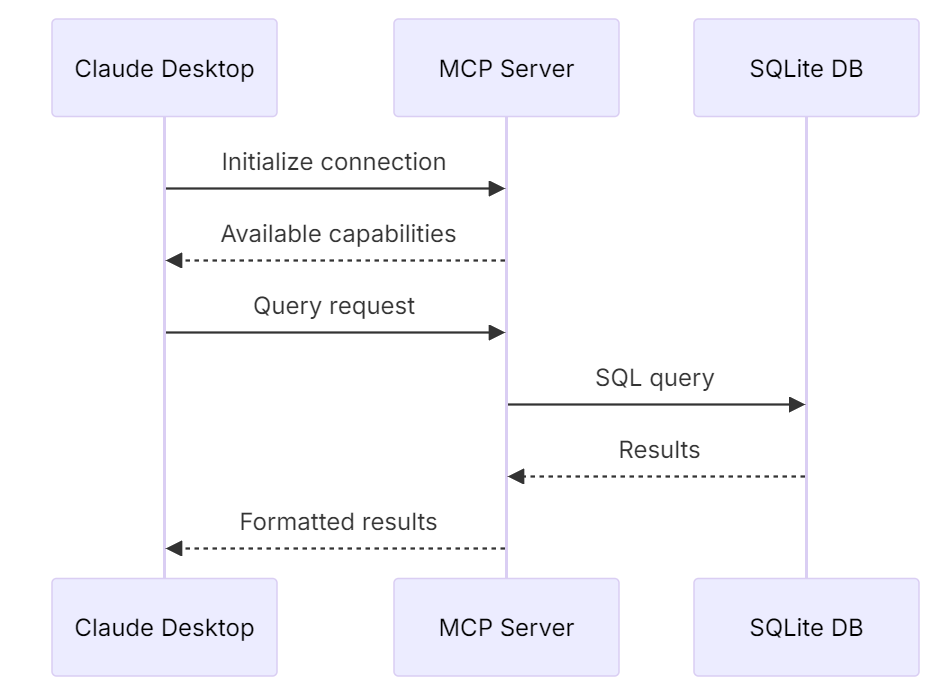
It allows to connect to a local database via
"postgres": {
  "command": "npx",
  "args": ["-y", "@modelcontextprotocol/server-postgres", "postgresql://localhost/mydb"]
}
Another server example : weather server.
According to it’s github: modelcontextprotocol/servers: Model Context Protocol Servers, there are these servers available as of end of Nov 2024:
- Filesystem – Secure file operations with configurable access controls
- GitHub – Repository management, file operations, and GitHub API integration
- GitLab – GitLab API, enabling project management
- Git – Tools to read, search, and manipulate Git repositories
- Google Drive – File access and search capabilities for Google Drive
- PostgreSQL – Read-only database access with schema inspection
- Sqlite – Database interaction and business intelligence capabilities
- Slack – Channel management and messaging capabilities
- Sentry – Retrieving and analyzing issues from Sentry.io
- Memory – Knowledge graph-based persistent memory system
- Puppeteer – Browser automation and web scraping
- Brave Search – Web and local search using Brave’s Search API
- Google Maps – Location services, directions, and place details
- Fetch – Web content fetching and conversion for efficient LLM usage
 Naixian Zhang