Redis (REmote DIctionary Server) is an in-memory data structure store, used as:
A database; A cache; A message broker. It is known for ultra-low latency and high performance, often measured in microseconds.
Let’s build a tiny Redis clone in Python to understand the core mechanics of Redis.
import socket
import threading

# In-memory key-value store
store = {}

# Command handler
def handle_command(command):
    try:
        parts = command.strip().split()
        cmd = parts[0].upper()

        if cmd == 'SET' and len(parts) == 3:
            key, value = parts[1], parts[2]
            store[key] = value
            return "+OK\r\n"

        elif cmd == 'GET' and len(parts) == 2:
            key = parts[1]
            if key in store:
                return f"${len(store[key])}\r\n{store[key]}\r\n"
            else:
                return "$-1\r\n"  # Null response

        else:
            return "-ERR unknown command\r\n"

    except Exception as e:
        return f"-ERR {str(e)}\r\n"

# Handle each client in a new thread
def handle_client(conn, addr):
    print(f"[+] Connected from {addr}")
    buffer = b""
    while True:
        try:
            data = conn.recv(1024)
            if not data:
                break
            buffer += data

            # Basic newline-based protocol (not RESP fully)
            if b"\n" in buffer:
                command, buffer = buffer.split(b"\n", 1)
                response = handle_command(command.decode())
                conn.sendall(response.encode())

        except Exception as e:
            print(f"[!] Error: {e}")
            break
    conn.close()
    print(f"[-] Disconnected from {addr}")

# TCP Server
def start_server(host='127.0.0.1', port=6379):
    server = socket.socket(socket.AF_INET, socket.SOCK_STREAM)
    server.bind((host, port))
    server.listen(5)
    print(f"🚀 MiniRedis running on {host}:{port}")
    while True:
        conn, addr = server.accept()
        threading.Thread(target=handle_client, args=(conn, addr)).start()

if __name__ == "__main__":
    start_server()
Caching is all about temporarily storing data in memory for quick access — typically faster than a database or external API. Redis supports this because of a few fundamental design choices:
The RESP-style responses (+OK, $5, etc.) are minimal and fast to parse. Redis doesn’t carry the overhead of SQL or HTTP headers.
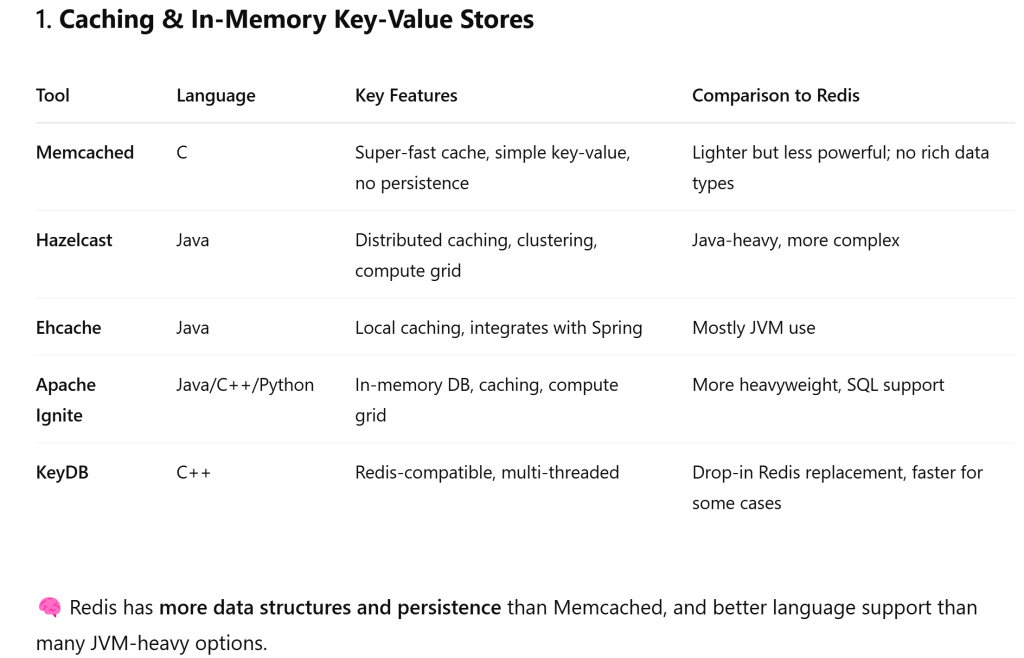
It’s important to understand and use redis with async: async allows your FastAPI server to handle many HTTP requests concurrently; Redis is your cache or shared memory, accessible by all workers!
import asyncio
import aioredis
from fastapi import FastAPI

app = FastAPI()
redis = aioredis.from_url("redis://localhost")

@app.get("/")
async def read_root():
    await redis.set("foo", "bar")
    val = await redis.get("foo")
    return {"foo": val.decode()}
Note async is great for handling many tasks at the same time — while the app is running.
Celery is great for handling tasks outside the app’s lifetime, in separate processes.
But in a simple case, I have an app that:
- Calls an external API for a long list of entities
- Each API call takes time
- After all entities are processed, I do aggregation
- Then I return the result to the user
Async is sufficient to do this: User Request –> async app (e.g. FastAPI) –> async gather() over all API calls –> aggregate –> return result
import httpx
import asyncio
from fastapi import FastAPI

app = FastAPI()

async def fetch_entity_data(entity):
    async with httpx.AsyncClient() as client:
        resp = await client.get(f"https://api.example.com/{entity}")
        return resp.json()

@app.post("/process-entities/")
async def process(entities: list[str]):
    # Step 1: Fetch all concurrently
    results = await asyncio.gather(*[fetch_entity_data(e) for e in entities])

    # Step 2: Aggregate
    total = sum(result["value"] for result in results)

    # Step 3: Return to user
    return {"total": total, "count": len(results)}
Makes all API calls concurrently; Uses only 1 process/thread; Is blazing fast compared to sequential code.
 Naixian Zhang