Kafka’s mechanism closely resembles that of the Robot Operating System (ROS), a prominent robot communication system. It is developed on the Java Virtual Machine and functions as a logbook, enabling users to view, pool, and manage data efficiently.
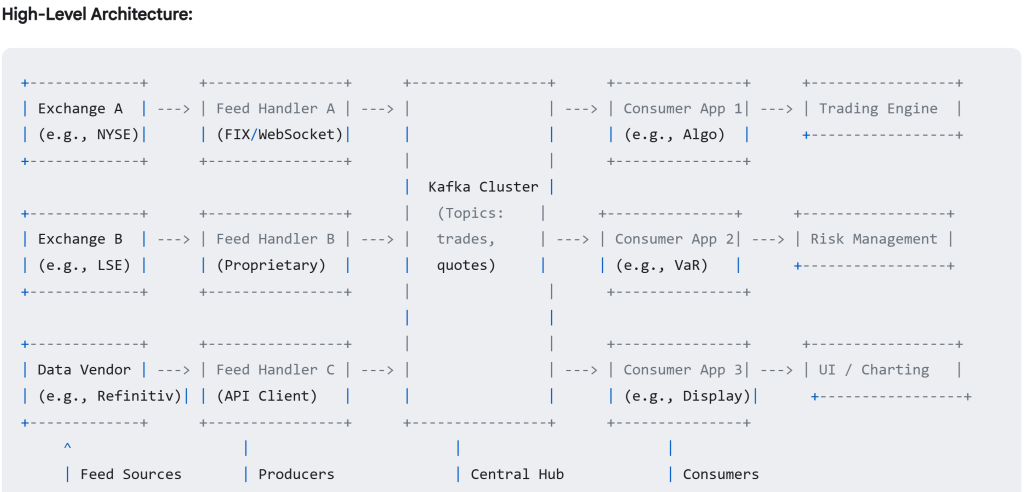
Utilize Kafka to manage real-time price data from various global exchanges. This represents a prevalent and robust application of Kafka’s capabilities. Kafka acts as a central, high-throughput, reliable “distribution hub” for the firehose of price data coming from various exchanges.
Webserver such as Heroku doesn’t run its own native Kafka service. Instead, it offers managed Apache Kafka services provided by third-party partners through the Heroku Add-ons Marketplace.
Remoted dictionary store, Redis is a super-fast, in-memory data structure store. it’s frequently used as a cache in front of or alongside a primary database (like PostgreSQL, MySQL, MongoDB). Redis provides excellent building blocks for implementing message queues or background job systems.
Heroku Redis provides a fully managed Redis instance, it provisions a Redis instance for you and automatically adds a configuration variable (environment variable) to your application’s settings. This variable contains the connection URL for your Redis instance.
Redis uses the RAM (Random Access Memory) of the server where the Redis software itself is running. Redis operates on a client-server model, just like a SQL database (like PostgreSQL or MySQL).
Network Connection: Your application (the client) must establish a network connection to the Redis server (provided by the add-on) using the connection details (like the REDIS_URL) provided in the Heroku environment variables. It sends commands (like SET, GET, LPUSH, PUBLISH) over this network connection and receives responses back.
Redis Server: This is the actual Redis software running somewhere, managing the data in its memory. When you use the Heroku Redis add-on, Heroku (or its partner) manages these Redis servers for you on separate infrastructure.
Redis Client: Your application code (running on a Heroku dyno) acts as the client. It needs a Redis client library (like redis-py for Python, redis for Node.js) to connect to the Redis server.

Kafka Add-on: The Inter-Departmental Announcement Log Streams
- Analogy: This isn’t a place you query for specific items like the archive or the desk cache. Instead, it’s like a series of official, continuously updated, chronological logbooks or announcement feeds for different departments (Topics). Think of a secure, replicated feed where departments post updates.
- Storage: Primarily Disk, but crucially, as an append-only log. Data (messages/events) is written sequentially, like adding entries to the end of a logbook. This sequential disk access is very fast, unlike the random disk access often needed by SQL databases. Kafka keeps these logs replicated and persistent for a configured amount of time (e.g., 7 days).
- Interaction (Different Model):
- Producers: Departments (your producer applications) connect to the Kafka service and append new announcements (“New book shipment arrived!”, “User 456 updated profile”, “Sensor reading is 37.C”) to the relevant logbook (Topic). They don’t wait for a specific result, just confirmation it was logged.
- Consumers: Other departments or interested parties (your consumer applications) connect and subscribe to specific logbooks (Topics). They read the announcements sequentially starting from where they last left off (tracking their position with a bookmark/offset). They don’t query for specific past events; they process the stream as it comes. Multiple independent groups can read the same logbook without interfering.
- Server: A cluster of Kafka broker servers managed by the Heroku add-on (or partner like Confluent/Aiven).
- Needs Connection? Yes, both producer and consumer apps connect to these servers.
- Kafka Add-on: The Inter-Departmental Announcement Log Streams
- Analogy: This isn’t a place you query for specific items like the archive or the desk cache. Instead, it’s like a series of official, continuously updated, chronological logbooks or announcement feeds for different departments (Topics). Think of a secure, replicated feed where departments post updates.
- Storage: Primarily Disk, but crucially, as an append-only log. Data (messages/events) is written sequentially, like adding entries to the end of a logbook. This sequential disk access is very fast, unlike the random disk access often needed by SQL databases. Kafka keeps these logs replicated and persistent for a configured amount of time (e.g., 7 days).
- Interaction (Different Model):
- Producers: Departments (your producer applications) connect to the Kafka service and append new announcements (“New book shipment arrived!”, “User 456 updated profile”, “Sensor reading is 37.C”) to the relevant logbook (Topic). They don’t wait for a specific result, just confirmation it was logged.
- Consumers: Other departments or interested parties (your consumer applications) connect and subscribe to specific logbooks (Topics). They read the announcements sequentially starting from where they last left off (tracking their position with a bookmark/offset). They don’t query for specific past events; they process the stream as it comes. Multiple independent groups can read the same logbook without interfering.
- Server: A cluster of Kafka broker servers managed by the Heroku add-on (or partner like Confluent/Aiven).
- Needs Connection? Yes, both producer and consumer apps connect to these servers.
Mimicking a real case that I bought live price and need to send live data to my clients:
First Establish and maintain persistent connections to each exchange’s API (could be FIX, WebSocket, proprietary protocols). Receive the raw price data (quotes, trades). Then Connect to your Heroku Kafka add-on using the provided environment variables (KAFKA_URL, credentials, etc.).
Serialize your normalized data (e.g., into JSON bytes or Avro binary).
Send messages to Kafka Topics: Use distinct topics, e.g., price-quotes and price-trades.
Crucially, use the trading symbol (e.g., AAPL, EURUSD) as the Kafka message key. This ensures all updates for the same symbol go to the same Kafka partition, guaranteeing processing order per symbol within your consumers.
Deployment: These could be separate worker dynos on Heroku, or potentially run on more dedicated infrastructure (like EC2) if the connection requirements or resource needs are very high/specific.
- The final recipients of the data (e.g., a trading UI in a browser, a mobile app, an automated trading bot connecting via API).
- Tasks:
- Establish a WebSocket connection to your Distribution Service.
- Send subscription messages (e.g., {“action”: “subscribe”, “symbols”: [“AAPL”, “MSFT”]}).
- Receive price update messages pushed by the Distribution Service.
- Display the data or act upon it.
- Handle connection drops and reconnections.
Next, think about how to store time-stamped data to build up history:
Historical Storage (The Core – Often Multiple Tiers)
This is where vendors use specialized databases designed for huge volumes and time-series data. Common choices include:
- a) Time-Series Databases (TSDBs): (e.g., InfluxDB, TimescaleDB [on PostgreSQL], QuestDB, ClickHouse – though often used as columnar too)
- Why: Explicitly designed for time-stamped data. They offer:
- High Ingestion Rates: Optimized for writing streams of time-series data quickly.
- Efficient Storage: Excellent compression algorithms specifically for time-series data (delta encoding, Gorilla compression, etc.).
- Fast Time-Based Queries: Indexed heavily on time, making queries for specific time ranges very fast (SELECT * WHERE time > T1 AND time < T2 AND symbol = ‘XYZ’).
- Built-in Functions: Often include functions for time-based aggregation (time bucketing, downsampling), calculating moving averages, etc.
- Data Retention Policies: Easily configure rules to automatically drop or downsample old data.
- Use: Often used for “hot” or “warm” data (e.g., recent minutes, hours, days, months) that needs fast query access.
- Why: Explicitly designed for time-stamped data. They offer:
- b) Distributed File Systems / Data Lakes + Query Engines: (e.g., HDFS, AWS S3, Azure Data Lake Storage + Presto, Spark SQL, AWS Athena)
- Why: Extremely scalable and cost-effective for storing massive volumes of historical data (“cold” storage).
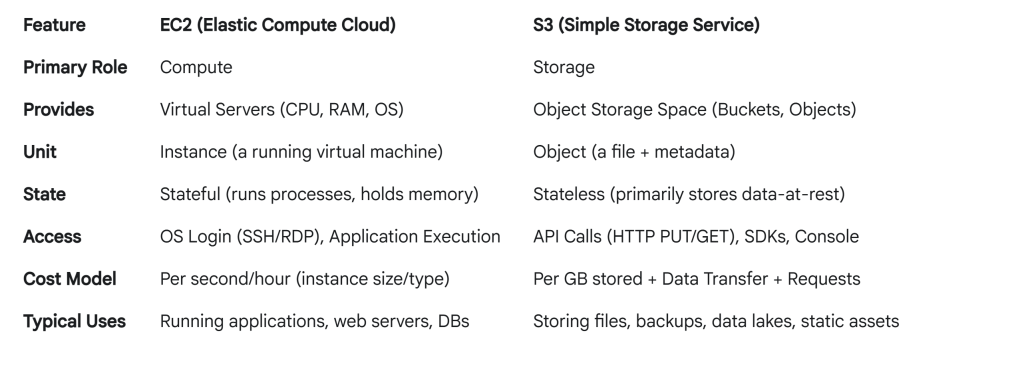
Note EC2 = Rentable virtual servers from Amazon. Amazon Elastic Compute Cloud.
AWS S3 stands for Amazon Simple Storage Service. It’s designed to store and retrieve any amount of data from anywhere on the web via simple API calls. Common Use Cases:
Data Lakes: Storing massive amounts of raw data (like historical market ticks) for analysis. This is highly relevant to our previous discussion.
Backup and Restore: A common target for database backups, logs, and application data.
Archiving: Long-term data storage using cheaper S3 Glacier classes.
Static Website Hosting: Hosting website assets like HTML, CSS, JavaScript, and images directly.
Application Data: Storing user-generated content like images or videos.
Big Data Analytics: Often used as the storage layer for tools like Amazon Athena, Amazon EMR (Spark/Hadoop), and Amazon Redshift Spectrum. AWS S3 is the primary candidate for the “Data Lake / Distributed File System” layer. Vendors would typically write batches of normalized tick data (often in Parquet or ORC format) into S3 buckets, partitioned by date/symbol, for cost-effective, long-term storage and querying via engines like Athena or Spark.
 Naixian Zhang