The core Tree-sitter project and its query language were primarily created by Max Brunsfeld.
He was a key developer at GitHub, where Tree-sitter was originally developed for use in the Atom text editor. Tree-sitter was first released in 2018.
While Atom has since been sunsetted, Tree-sitter has found a life of its own as a widely adopted open-source project, powering features in many other editors (like Neovim, Zed, Helix, and as we discussed, Cursor and Codeium/Windsurf) and various code analysis tools across the industry. Max Brunsfeld has since gone on to co-found Zed, another editor that heavily leverages Tree-sitter.
Tree-sitter accomplishes distinguishing between “sum” as a variable versus “sum” as a function by building a Concrete Syntax Tree (CST) that reflects the grammatical structure of the code, not just the sequence of characters.
Here’s a detailed breakdown:
1. The Language Grammar is Key
Each programming language (Python, JavaScript, C++, etc.) has a specific grammar defined for Tree-sitter. This grammar explicitly tells Tree-sitter how to recognize different constructs.
For example, in a Python grammar:
- It defines what a
function_definitionlooks like (e.g.,defkeyword, followed by anidentifierfor the name, thenparameters, a colon, and ablockof code). - It defines what a
variable_assignmentlooks like (e.g., anidentifier, followed by an=, then anexpression). - It defines what a
call_expressionlooks like (e.g., anexpressionthat evaluates to a callable, followed byargument_list).
2. Concrete Syntax Tree (CST)
When Tree-sitter parses the code, it doesn’t just see “sum”. It sees “sum” in a context within the code’s structure.
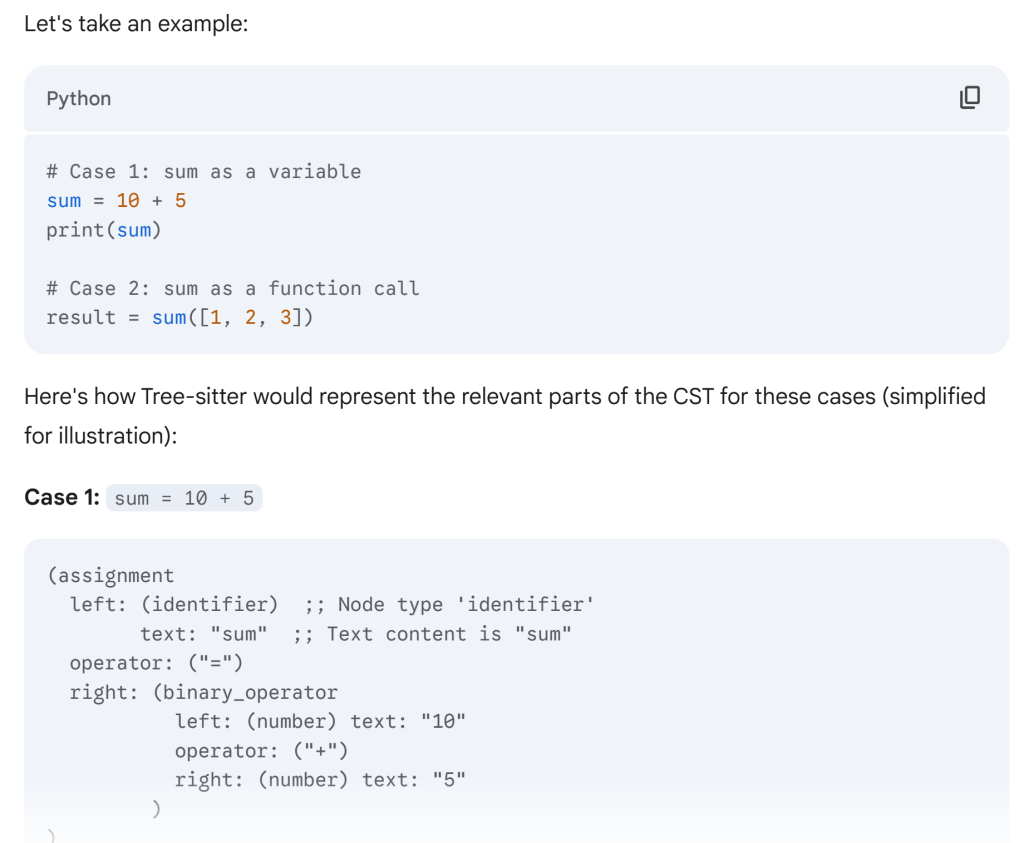
In this CST, the text “sum” is encapsulated within an (identifier) node, which is, in turn, a child of an (assignment) node, specifically in the left field. This structural information tells Tree-sitter (and any tool querying it) that “sum” here is the target of an assignment, which strongly implies it’s a variable.
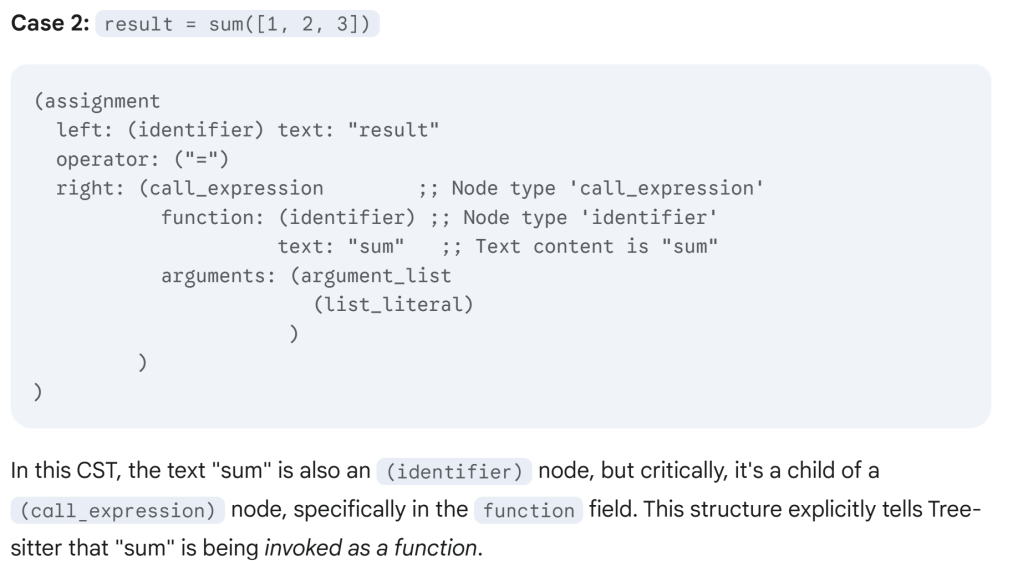
In essence, Tree-sitter doesn’t just look at the characters “s”, “u”, “m”. It builds a rich, hierarchical understanding of where those characters appear within the defined syntax of the language. It knows if “sum” is in a function_definition node’s name field, or an assignment node’s left field, or a call_expression node’s function field. This contextual structural information, provided by the concrete syntax tree and exposed by the query language, is how it can accurately differentiate between a variable and a function (or a type, or a parameter, or a keyword, etc.).
How Tree-sitter and LLMs Collaborate in Cursor (and similar editors):
Tree-sitter acts as a crucial “pre-processor” and “context manager” for the LLM.
- Codebase Indexing and Semantic Chunking (Tree-sitter’s Role):
- Parsing: Tree-sitter parses all the files in your project (or at least the open ones and frequently used ones) into Concrete Syntax Trees (CSTs). This creates a precise, structured representation of your code.
- Logical Chunking: Instead of just splitting files by lines or arbitrary character counts, Tree-sitter allows Cursor to identify semantically meaningful chunks of code. This means functions, classes, methods, blocks, and even individual statements become identifiable units. This is vastly superior to simple text-based chunking.
- Embedding Generation: Each of these semantically meaningful chunks is then converted into a numerical representation called an embedding using a smaller, specialized AI model (an embedding model). Embeddings capture the semantic meaning of the code snippet in a high-dimensional vector space. Code snippets that are semantically similar will have embeddings that are “close” to each other in this space.
- Vector Database: These embeddings are stored in a vector database. This database can be quickly searched to find code snippets that are semantically similar to your current context or prompt.
- Intelligent Context Retrieval (The Bridge):
- When you type a prompt in Cursor (e.g., “Implement a
calculate_totalfunction here” or “Explain thisMyClass“), Cursor doesn’t just send your current file. - It uses your current cursor position, the code you’ve selected, and your natural language prompt to perform a semantic search in its vector database. It finds the most relevant code chunks (functions, classes, files, documentation) from across your entire codebase that are semantically related to your request.
- Tree-sitter’s contribution here is critical: It ensures that the retrieved “chunks” are complete and meaningful code constructs, not just random lines of text that might break the LLM’s understanding.
- When you type a prompt in Cursor (e.g., “Implement a
- Prompt Construction (The Orchestration):
- Once the relevant context chunks are retrieved, Cursor’s backend (often an orchestration layer) meticulously constructs the final prompt for the LLM. This prompt typically includes:
- Your natural language instruction.
- The code immediately around your cursor.
- The semantically relevant code chunks retrieved from the vector database (often annotated with file paths or symbol names).
- Relevant documentation (from
@mentions or.cursorrulesfiles). - Editor state (e.g., current file name, language, selected text).
- Specific instructions/rules Cursor provides to guide the LLM’s behavior (e.g., “produce clear, readable code,” “adhere to project standards,” “fix lint errors”).
- Once the relevant context chunks are retrieved, Cursor’s backend (often an orchestration layer) meticulously constructs the final prompt for the LLM. This prompt typically includes:
- LLM Inference (The “Brain”):
- This carefully constructed prompt is sent to a powerful Large Language Model (e.g., Claude, GPT-4, or Cursor’s proprietary models).
- The LLM processes this context and your request, and generates a response – which could be code, an explanation, a refactoring suggestion, or even a plan.
- Response Application and Refinement (Editor’s Role):
- The LLM’s raw output might not always be perfect or immediately applicable.
- Cursor uses its own internal logic (which might involve further Tree-sitter analysis and potentially a smaller “application AI”) to:
- Parse the LLM’s output: Tree-sitter can re-parse the generated code to ensure it’s syntactically valid before attempting to apply it.
- Generate Diffs/Patches: It intelligently creates a diff (the changes to be applied) to your existing files, ensuring seamless integration.
- Iterate and Refine: For complex tasks, Cursor can engage in multi-turn conversations with the LLM or even auto-correct issues (e.g., “loops on errors” to fix lint/type errors identified by a language server after an LLM’s suggestion).
- Apply Formatting: Interact with integrated formatters (often powered by language servers that also use Tree-sitter) to ensure the newly generated code adheres to project style.
 Naixian Zhang