Why engineers love Claude Code, it adheres to the Unix philosophy: Claude Code is composable and scriptable. tail -f app.log | claude -p "Slack me if you see any anomalies appear in this log stream" works. Your CI can run claude -p "If there are new text strings, translate them into French and raise a PR for @lang-fr-team to review".
Essential commands
Here are the most important commands for daily use:
| Command | What it does | Example |
|---|---|---|
claude | Start interactive mode | claude |
claude "task" | Run a one-time task | claude "fix the build error" |
claude -p "query" | Run one-off query, then exit | claude -p "explain this function" |
claude -c | Continue most recent conversation | claude -c |
claude -r | Resume a previous conversation | claude -r |
claude commit | Create a Git commit | claude commit |
/clear | Clear conversation history | > /clear |
/help | Show available commands | > /help |
exit or Ctrl+C | Exit Claude Code | > exit |
Save time with shortcuts
- Use Tab for command completion
- Press ↑ for command history
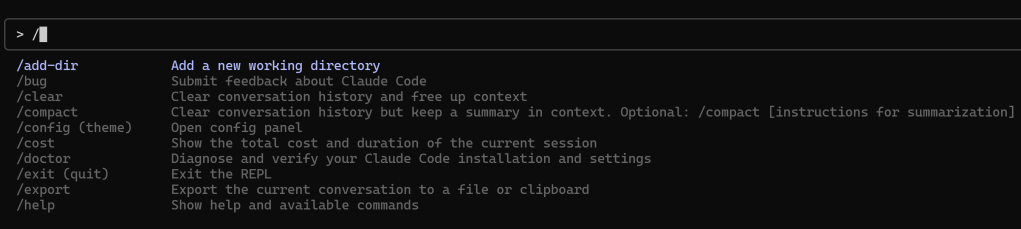
- Type
/to see all slash commands
Learn about common workflows with Claude Code.
get a quick codebase overview, then find relevant codes
fix bugs efficiently, can tell Claude the command to reproduce the issue and get a stack trace, mention any steps to reproduce the error, let it know if the error is intermittent or consistent.
refactor code, find deprecated api usage in our codebase, suggest how to refactor utils.js to use modern js features, refactor utils.js to use ES2024 features while maitening the same behavior, run tests for the refactored code
work with tests, add test cases for edge conditions in the notification service, run and verfiy tests
create pull resquests, summarize the changes, create a pr,
handle documentation, find functions without proper JSDoc commetns in the auth module,
work with images, you can drag and drop an image, cop and paste, or provide image path, what does this image show
reference files and directories, show me the data from an MCP resources via a github repo link
use extended thinking, provide context and ask claude to think, refine the thinking with follow-up prompts, think harder about edge case we should handle
resume previous conversations claude –continue
Continue most recent conversation
claude –continue
Continue most recent conversation with a specific prompt
claude –continue –print “Show me our progress”
Show conversation picker
claude –resume
Continue most recent conversation in non-interactive mode
claude –continue –print “Run the tests again”
run parallel claude code sessions with git worktrees
use claude as a unix-style utility, you can add claude to your build script:
// package.json
{
…
“scripts”: {
…
“lint:claude”: “claude -p ‘you are a linter. please look at the changes vs. main and report any issues related to typos. report the filename and line number on one line, and a description of the issue on the second line. do not return any other text.'”
}
}
pipe in, pipe out, cat build-error.txt | claude -p ‘concisely explain the root cause of this build error’ > output.txt
control output format: cat log.txt | claude -p ‘parse this log file for errors’ –output-format stream-json
create custom slash commands
add command arguments with @ARGUMENTS
The Python SDK is available as claude-code-sdk on PyPI:
There is the special thing called Claude Code Hooks, Hooks are shell commands that execute automatically at specific events during your Claude Code session. They let you customize behavior, add security, logging, or custom workflows.
PreToolUse: Runs before any tool execution
- Validate inputs
- Block dangerous operations
- Add context or modify environment
PostToolUse: Runs after tool completion
- Log results
- Cleanup operations
- Trigger follow-up actions
UserPromptSubmit: Runs when you submit a prompt
- Add dynamic context
- Validate requests
- Implement custom preprocessing
Stop: Runs when I finish responding
- Save session state
- Generate reports
- Cleanup resources
Configuration Example {
“hooks”: [
{
“match”: { “event”: “PreToolUse”, “tool”: “Bash” },
“command”: “echo ‘About to run bash command: $TOOL_INPUT'”
},
{
“match”: { “event”: “UserPromptSubmit” },
“command”: “./add-context.sh”
}
]
}
Imagine hooks as automatic scripts that run when specific things happen during our conversation.
 Naixian Zhang