Large codebases are like onions – layers upon layers. You don’t need to understand everything. Focus on:
- Entry points – where does execution start?
- Core domain – what’s the main business logic?
- Interfaces – how do users/systems interact?
Everything else is implementation detail you can explore when needed.
1: Start with Entry Points: Always find index.ts or main first:
index.ts:42-99 –> Uses yargs to define CLI commands; Each command imports from cli/cmd/*.ts (yargs are CLI argument parser for Node.js)
The entry point reveals the command structure: RunCommand – main interactive mode; ServeCommand – headless API server; AgentCommand – agent management etc. (headless API server is a backend that provides data and functionality via APIs only — with no built-in user interface. “Headless” = no front end attached)
2: Understand the Directory Naming Convention, Most TypeScript/Node projects follow a similar structure:
- Infrastructure folders = cross-cutting concerns (config, storage, util)
- Domain folders = core business logic
- Interface folders = how users interact (cli, server, ui)
src/
+– agent/ # Domain: Agent definitions
+– session/ # Domain: Conversation state
+– provider/ # Domain: LLM abstraction
+– tool/ # Domain: Tool implementations
+– permission/ # Domain: Access control
+– config/ # Infrastructure: Settings
+– storage/ # Infrastructure: Persistence
+– util/ # Shared utilities
+– cli/ # Interface: Command line
+– server/ # Interface: HTTP API
3: Use Namespace Exports to Find APIs. OpenCode uses TypeScript namespaces extensively. Find them with: Search(pattern: “^export namespace”, path: “Documents\gitfolder\opencode\packages\opencode\src”, output_mode: “content”, head_limit: 30), This reveals the module map:
┌───────────┬──────────────────────┬────────────────────────┐
│ Namespace │ File │ Purpose │
├───────────┼──────────────────────┼────────────────────────┤
│ Agent │ agent/agent.ts │ Agent definitions │
├───────────┼──────────────────────┼────────────────────────┤
│ Session │ session/index.ts │ Conversation state │
├───────────┼──────────────────────┼────────────────────────┤
│ Provider │ provider/provider.ts │ LLM abstraction │
├───────────┼──────────────────────┼────────────────────────┤
│ Config │ config/config.ts │ Settings management │
├───────────┼──────────────────────┼────────────────────────┤
│ Bus │ bus/index.ts │ Event system │
├───────────┼──────────────────────┼────────────────────────┤
│ LSP │ lsp/index.ts │ Language Server │
├───────────┼──────────────────────┼────────────────────────┤
│ MCP │ mcp/index.ts │ Model Context Protocol │
├───────────┼──────────────────────┼────────────────────────┤
│ Auth │ auth/index.ts │ Authentication │
└───────────┴──────────────────────┴────────────────────────┘
4: Trace the Request Flow, what happens when userse enter the input
User Input
|
v
cli/cmd/run.ts # Captures input
|
v
session/prompt.ts # SessionPrompt.prompt()
|
v
session/llm.ts # LLM.stream() – calls provider
|
v
provider/provider.ts # Provider abstraction
|
v
tool/registry.ts # Tools available to LLM
|
v
[Tool execution] # bash, read, edit, etc.
|
v
session/message.ts # Store response
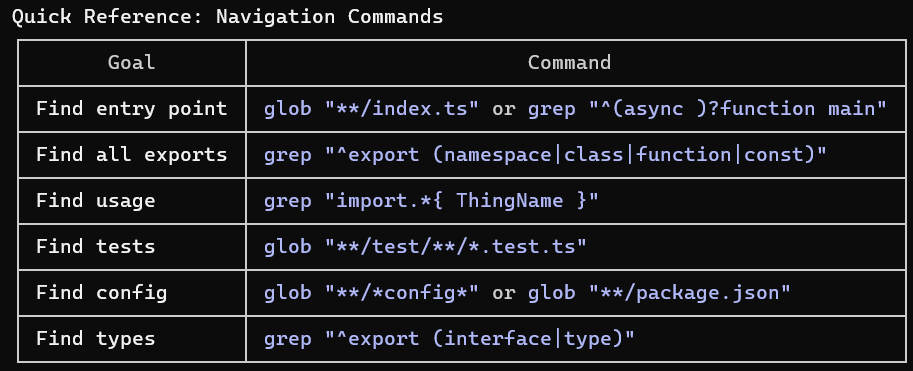
5: Search Patterns for Common Tasks
Find where something is defined:
# Find a function definition
grep “export.*function functionName”
# Find a class/type
grep “export (interface|type|class) TypeName”
# Find where something is used
grep “import.*{ ThingName }”
Find related files:
# Find all files related to “tool”
glob “/tool//*.ts”
# Find test files for a module
glob “/test//agent*.ts”
For example, Search(pattern: “*/tool/.ts”, path: “Documents\gitfolder\opencode\packages\opencode\src”)
6: Read Tests to Understand Behavior. Tests are documentation: Search(pattern: “/test//*.test.ts”, path: “Documents\gitfolder\opencode\packages\opencode”)
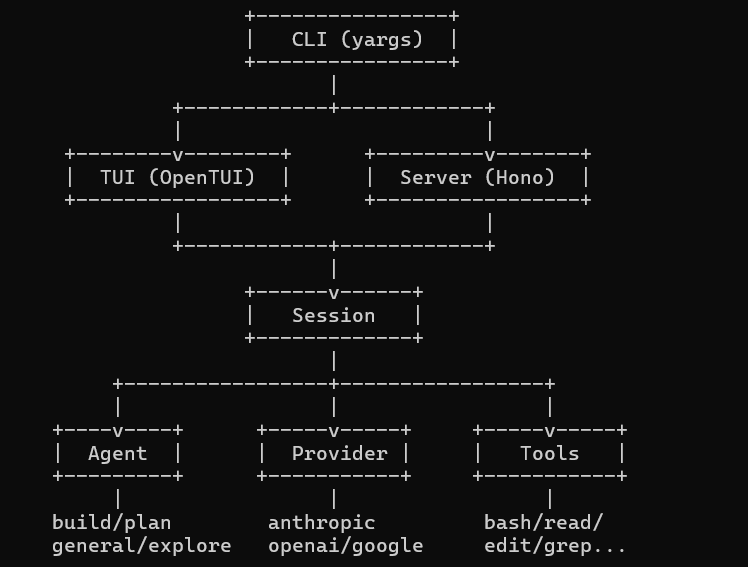
7: Build a Mental Map, For OpenCode, the mental map looks like:
 Naixian Zhang