"""
Use *args when we aren't sure how many arguments are going to be passed to a
function, or if we want to pass a stored list or tuple of arguments to a function.
**kwargs is used when we dont know how many keyword arguments will be passed to
a function, or it can be used to pass the values of a dictionary as keyword arguments.
The identifiers args and kwargs are a convention, you could also use *bob
and **billy but that would not be wise.
"""
def f(*args,**kwargs): print(args, kwargs)

l = [1,2,3]
t = (4,5,6)
d = {'a':7,'b':8,'c':9}

f()
f(1, 2, 3)
f(1, 2, 3, "groovy")
f(a=1,b=2,c=3)              # () {'a': 1, 'c': 3, 'b': 2}
f(a=1,b=2,c=3,zzz="hi")     # () {'a': 1, 'c': 3, 'b': 2, 'zzz': 'hi'}
f(1,2,3,a=1,b=2,c=3)        # (1, 2, 3) {'a': 1, 'c': 3, 'b': 2}

f(*l,**d)                   # (1, 2, 3) {'a': 7, 'c': 9, 'b': 8}
f(*t,**d)                   # (4, 5, 6) {'a': 7, 'c': 9, 'b': 8}
f(1,2,*t)                   # (1, 2, 4, 5, 6) {}
f(q="winning",**d)          # () {'a': 7, 'q': 'winning', 'c': 9, 'b': 8}
f(1,2,*t,q="winning",**d)   # (1, 2, 4, 5, 6) {'a': 7, 'q': 'winning', 'c': 9, 'b': 8}

def f2(arg1,arg2,*args,**kwargs): print(arg1,arg2, args, kwargs)

f2(1,2,3)                       # 1 2 (3,) {}
f2(1,2,3,"groovy")              # 1 2 (3, 'groovy') {}
f2(arg1=1,arg2=2,c=3)           # 1 2 () {'c': 3}
f2(arg1=1,arg2=2,c=3,zzz="hi")  # 1 2 () {'c': 3, 'zzz': 'hi'}
f2(1,2,3,a=1,b=2,c=3)           # 1 2 (3,) {'a': 1, 'c': 3, 'b': 2}

f2(*l,**d)                   # 1 2 (3,) {'a': 7, 'c': 9, 'b': 8}
f2(*t,**d)                   # 4 5 (6,) {'a': 7, 'c': 9, 'b': 8}
f2(1,2,*t)                   # 1 2 (4, 5, 6) {}
f2(1,1,q="winning",**d)      # 1 1 () {'a': 7, 'q': 'winning', 'c': 9, 'b': 8}
f2(1,2,*t,q="winning",**d)   # 1 2 (4, 5, 6) {'a': 7, 'q': 'winning', 'c': 9, 'b': 8}

#hese mean to you: @classmethod, @staticmethod, @property
#they are decorator is a special kind of function that either takes a function
#and returns a function, or takes a class and returns a class. The @ symbol is
#just syntactic sugar that allows you to decorate something in a way that's easy to read.
@my_decorator
def my_func(stuff):
    do_things

def my_func(stuff):
    do_things

my_func = my_decorator(my_func)

class MyClass(object):
    def __init__(self):
        self._some_property = "properties are nice"
        self._some_other_property = "VERY nice"
    def normal_method(*args,**kwargs):
        print("calling normal_method({0},{1})".format(args,kwargs))
    @classmethod
    def class_method(*args,**kwargs):
        print("calling class_method({0},{1})".format(args,kwargs))
    @staticmethod
    def static_method(*args,**kwargs):
        print("calling static_method({0},{1})".format(args,kwargs))
    @property
    def some_property(self,*args,**kwargs):
        print("calling some_property getter({0},{1},{2})".format(self,args,kwargs))
        return self._some_property
    @some_property.setter
    def some_property(self,*args,**kwargs):
        print("calling some_property setter({0},{1},{2})".format(self,args,kwargs))
        self._some_property = args[0]
    @property
    def some_other_property(self,*args,**kwargs):
        print("calling some_other_property getter({0},{1},{2})".format(self,args,kwargs))
        return self._some_other_property
o = MyClass()
# undecorated methods work like normal, they get the current instance (self) as the first argument

o.normal_method
# <bound method MyClass.normal_method of <__main__.MyClass instance at 0x7fdd2537ea28>>
o.normal_method()
# normal_method((<__main__.MyClass instance at 0x7fdd2537ea28>,),{})
o.normal_method(1,2,x=3,y=4)
# normal_method((<__main__.MyClass instance at 0x7fdd2537ea28>, 1, 2),{'y': 4, 'x': 3})

# class methods always get the class as the first argument
o.class_method
# <bound method classobj.class_method of <class __main__.MyClass at 0x7fdd2536a390>>

o.class_method()
# class_method((<class __main__.MyClass at 0x7fdd2536a390>,),{})

o.class_method(1,2,x=3,y=4)
# class_method((<class __main__.MyClass at 0x7fdd2536a390>, 1, 2),{'y': 4, 'x': 3})

# static methods have no arguments except the ones you pass in when you call them

o.static_method
# <function static_method at 0x7fdd25375848>

o.static_method()
# static_method((),{})

o.static_method(1,2,x=3,y=4)
# static_method((1, 2),{'y': 4, 'x': 3})
# properties are a way of implementing getters and setters. It's an error to explicitly call them
# "read only" attributes can be specified by creating a getter without a setter (as in some_other_property)

o.some_property
# calling some_property getter(<__main__.MyClass instance at 0x7fb2b70877e8>,(),{})
# 'properties are nice'

o.some_property()
# calling some_property getter(<__main__.MyClass instance at 0x7fb2b70877e8>,(),{})
# Traceback (most recent call last):
#   File "<stdin>", line 1, in <module>
# TypeError: 'str' object is not callable

o.some_other_property
# calling some_other_property getter(<__main__.MyClass instance at 0x7fb2b70877e8>,(),{})
# 'VERY nice'

o.some_other_property()
# calling some_other_property getter(<__main__.MyClass instance at 0x7fb2b70877e8>,(),{})
# Traceback (most recent call last):
#   File "<stdin>", line 1, in <module>
# TypeError: 'str' object is not callable

o.some_property = "groovy"
# calling some_property setter(<__main__.MyClass object at 0x7fb2b7077890>,('groovy',),{})

o.some_property
# calling some_property getter(<__main__.MyClass object at 0x7fb2b7077890>,(),{})
# 'groovy'

o.some_other_property = "very groovy"
# Traceback (most recent call last):
#   File "<stdin>", line 1, in <module>
# AttributeError: can't set attribute

o.some_other_property
# calling some_other_property getter(<__main__.MyClass object at 0x7fb2b7077890>,(),{})
# 'VERY nice'

#10 OO programming is really, really important. Really. Answering this question
#shows your understanding of inheritance and the use of Python's super function
class A(object):
    def go(self):
        print("go A go!")
    def stop(self):
        print("stop A stop!")
    def pause(self):
        raise Exception("Not Implemented")

class B(A):
    def go(self):
        super(B, self).go()
        print("go B go!")

class C(A):
    def go(self):
        super(C, self).go()
        print("go C go!")
    def stop(self):
        super(C, self).stop()
        print("stop C stop!")

class D(B,C):
    def go(self):
        super(D, self).go()
        print("go D go!")
    def stop(self):
        super(D, self).stop()
        print("stop D stop!")
    def pause(self):
        print("wait D wait!")

class E(B,C): pass

a = A()
b = B()
c = C()
d = D()
e = E()

# specify output from here onwards

a.go()
b.go()
c.go()
d.go()
e.go()

a.stop()
b.stop()
c.stop()
d.stop()
e.stop()

a.pause()
b.pause()
c.pause()
d.pause()
e.pause()

#composition and object construction is what objects are all about. Objects are
#composed of stuff and they need to be initialised somehow. This also ties up
#some stuff about recursion and use of generators.
#
#Generators are great. You could have achieved similar functionality to print_all_2
#by just constructing a big long list and then printing it's contents.
#One of the nice things about generators is that they don't need to take up much space in memory.
#
#It is also worth pointing out that print_all_1 traverses the tree in a
#depth-first manner, while print_all_2 is width-first. Make sure you understand
#those terms. Sometimes one kind of traversal is more appropriate than the other. But that depends very much on your application.

#Locating and avoiding bottlenecks is often pretty worthwhile
# lovely profiling package that should do the trick
It come handy to use pd.DataFrame to construct a loop, now I’d like to try to use dictionary, list etc.
listt = {}
listt[‘fcf_cov’] = []
listt[‘div_cov’] = []
for day in sdates:
print day
dayfile = un[un.date == day]
coveredratio = len(dayfile[dayfile.fe_estimate.notnull()])/float(len(dayfile))
coveredratio2 = len(dayfile[dayfile[‘fe_estimate.2’].notnull()])/float(len(dayfile))
listt[‘fcf_cov’].append(coveredratio)
listt[‘div_cov’].append(coveredratio2)
listt
Another example to deeply understand dictionary is
data = {}
for col in [‘foo’, ‘bar’, ‘baz’]:
for row in [‘a’, ‘b’, ‘c’, ‘d’]:
data.setdefault(col, {})[row] = np.random.randn()
pd.DataFrame(data)
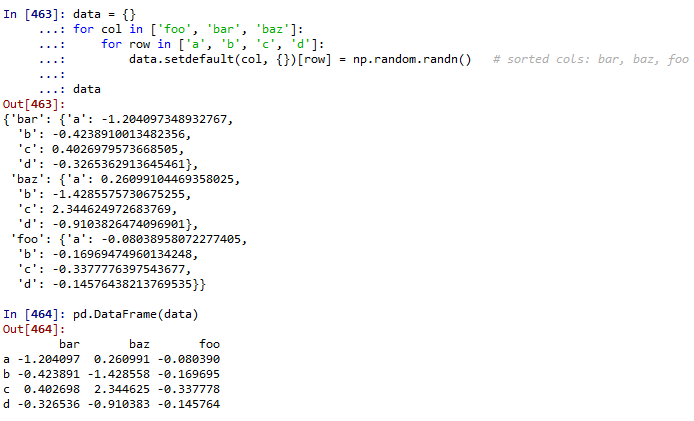
Referencing Raymond Hettinger’s neat and pythonic ways to accomplish tasks such that the columns can be dynamically added per the nature of input data:
colors = [‘red’,’green’,’blue’,’yellow’]
d = {}
for color in colors:
if color not in d:
d[color] = 0
d[color] += 1
d
Out[500]: {‘blue’: 1, ‘green’: 1, ‘red’: 1, ‘yellow’: 1}
d = {}
for name in names:
key = len(name)
d.setdefault(key, []).append(name)
while d:
key, value = d.popitem()
print key, ‘–>’, value
1 –> [‘a’]
3 –> [‘had’]
4 –> [‘Mary’, ‘lamb’]
6 –> [‘little’]
This equivalent to the non-pythonic way as
names = [‘Mary’, ‘had’, ‘a’, ‘little’, ‘lamb’]
d = {}
for name in names:
key = len(name)
if key not in d:
d[key] = []
d[key].append(name)
d
Out[504]: {1: [‘a’], 3: [‘had’], 4: [‘Mary’], 6: [‘little’]}
 Naixian Zhang