Need bolster skills of using Markdown again, April 2024, use chatGPT to help sweep off barriers fast:
first, headers, use one hashtag for large fonts and two for smaller, so on
second, Bold text is created using double asterisks (**) or double underscores (__) around the text. Italic text is created using a single asterisk (*) or underscore (_) around the text.
third, Inline links are created using brackets and parentheses. The brackets hold the link text, and the parentheses hold the url. [sample](xxx.com), images use similar syntax as links, but they include an exclamation mark (!) at the beginning. 
fourth, reate unordered lists using asterisks, plus signs, or hyphens. Ordered lists can be created by using numbers followed by periods.
fifth, use > in front for block code and backtick quote in both ends for code block
lastly the tagging is useful, so for anywhere there is the text to display block, I need it to be linked to my_id, first type below two sections:
[Text to display](#my_id)
<a id="my_id"></a>
## This is a section I want to link to
Rather than familiar text editor such as Microsoft Word, most engineers prefer markdown language (with extension .md) for daily writing and creating. It’s light-weight formatting syntaxed language, fit for CSS style embedding, simple to write, edit and read, especially for posting on GitHub repository.
My plan to conslidate all my work on GitHub makes is a must-to-learn skill.
After a brief investigation, I decide to use Dillinger as my default editor. I probably will switch to other tools such as visual studio, sublime text but so far, Dillinger is of the most convenient and user-friendly.
The web link is this. Before I touch on basics, which I primarily use, this link is useful to be referenced in the future.
# Dillinger
## Dillinger
### Dillinger
#### dillinger
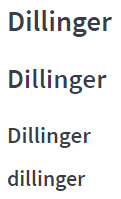
I note the space is important, it’s not that random that you can place space anywhere anytime you wish.
Another import feature I definitely will use is to set hyperlink. The markdown language syntax is like below. use square bracket to show a highlighted text, while the actual link address is set in the end of the file.
* [AngularJS] – HTML enhanced for web apps!
snip
[AngularJS]:
More complex display such as an icon/graph with an embedded hyperlink is set similarly.
[%5D(https://nodesource.com/products/nsolid)

And if you want to display png file (pictures)
the graph will nicely displayed as you wish.
 Naixian Zhang
%5D(https://nodesource.com/products/nsolid)
%5D(https://travis-ci.org/joemccann/dillinger)
%5D(https://github.com/znaixian/Python-Application-in-Financial-Modeling-/blob/master/pictures/test_py_file_disamble.PNG?raw=true)